

BeamTracker Overview
Introduction to BeamTracker - a laser-based production counting and utilization monitoring device for real-time part tracking and downtime analysis.
What is BeamTracker?
BeamTracker is a precision laser/LiDAR sensor designed for real-time production counting, utilization tracking, and downtime monitoring across automated or semi-automated production lines. Using non-contact laser detection, it accurately counts parts, monitors throughput, and provides actionable insights through the IoTFlows platform.

Key Capabilities
BeamTracker provides comprehensive production monitoring:
- Accurate part counting and throughput rates
- Real-time utilization and performance visibility
- Automated alerts for slow production or unexpected downtime
- Downtime classification and root-cause analysis
- Historical production trends and efficiency reports
- Notifications to operators and managers for rapid issue resolution
- Encrypted data transmission (in-transit and at-rest)
What Makes BeamTracker Different?
Laser-Based Detection
- Non-contact measurement — No physical contact with parts required
- Precision laser/LiDAR sensor — Accurate detection of passing objects
- Configurable detection range — Adapt to various part sizes and speeds
- Works with any part type — Packages, bottles, components, or products
Built-in Display
- Touchscreen interface — Configure directly on device
- Real-time feedback — See detection status immediately
- On-screen calibration — Set sensor range without dashboard
- Status monitoring — Check connection and operation at a glance
Plug-and-Play Deployment
- No PLC integration needed — Works independently
- Pre-configured — Arrives ready to deploy
- Quick setup — 5-15 minutes typical installation
- Cloud-based — No on-site servers required
Flexible Installation
- Mounting bracket included — Stable positioning for accurate detection
- Multiple connectivity options — WiFi or 4G/LTE
- Industrial power — M12 connector (12-24V DC)
- Compact form factor — Fits various production environments
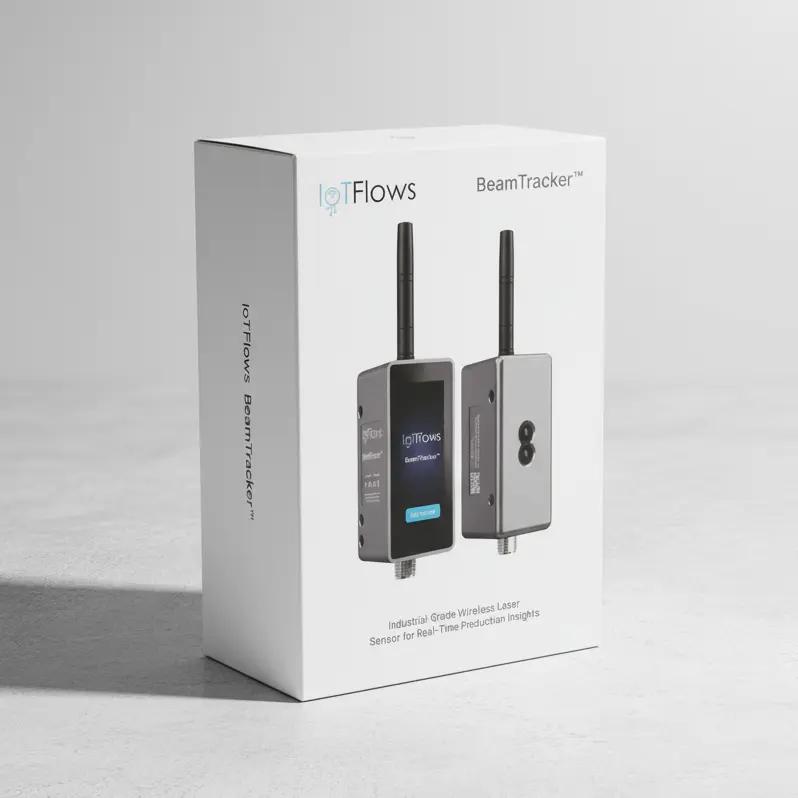
What's in the Box
Your BeamTracker package includes:
- 1× BeamTracker device with built-in touchscreen
- 1× External antenna
- 1× M12 Power adapter OR 1× M12 power cable + 1× M12 T-Splitter (Sold Separately)
- 1× Mounting bracket (Sold Separately)
Setup Requirements
Before getting started, ensure you have:
- IoTFlows account (sign up here)
- Internet connectivity via one of:
- WiFi network (2.4 GHz)
- IoTFlows 4G/LTE router
- Mobile device (iOS/Android) for WiFi setup
- Power outlet or industrial power supply (12-24V DC)
- Clear line of sight for laser beam across part flow
- Stable mounting location perpendicular to part flow
Ideal Applications
BeamTracker works with any industrial process where parts move through a detection zone:
Production Lines
- Packaging lines
- Assembly lines
- Bottling and filling operations
- Food processing
- Pharmaceutical manufacturing
Material Handling
- Conveyor systems
- Sorting operations
- Palletizing lines
- Distribution centers
Manufacturing
- Component production
- Part fabrication
- Quality inspection lines
- Product testing stations
Requirements
- Parts must pass through a defined path
- Clear line of sight for laser beam
- Consistent part flow direction
- Stable mounting position available
How It Works
1. Laser Detection
BeamTracker uses a single-point, invisible laser to detect objects passing through its beam. Think of it as a precision tripwire.
2. Part Counting
Each time a part breaks the laser beam, BeamTracker registers a count and timestamps the event.
3. State Detection
Based on time between parts (configurable), BeamTracker determines if production is:
- Running — Parts passing within expected timing
- Stopped — No parts detected for configured duration
4. Cloud Analytics
All data is transmitted to IoTFlows Cloud for:
- Real-time dashboard visibility
- Historical trend analysis
- Downtime classification
- Production reporting
- Alert generation
Key Metrics Tracked
Part Counts:
- Total parts counted
- Parts per minute/hour/shift
- Production rate trends
- Target vs. actual comparison
Utilization:
- Running vs. stopped time
- Percentage of available time productive
- Efficiency trends over time
Downtime:
- Duration and frequency
- Categorized by reason (manual or auto)
- Time-of-day patterns
- Root cause analysis
Alerts:
- Slow production warnings
- Extended downtime notifications
- Target shortfall alerts
- Custom thresholds
Next Steps
Ready to set up your BeamTracker?
Follow the setup guide in order:
- Installation — Mount and power up your device
- Network Setup — Connect to WiFi or 4G/LTE
- Dashboard Access — Verify device is working
- Calibration — Configure detection settings (required)
Need help? Contact Support
Learn how to fine-tune and calibrate your SenseAi Embedded device to accurately detect your machine states, thresholds, and vibration patterns for optimal OEE reporting.
Step-by-step guide to physically installing and powering up your BeamTracker device for production line monitoring.